Currency and FX rate versions
Explain why two people can see different numbers on the same screen.
Two analysts, one dashboard, different numbers, and both of them right.
Not every KPI is affected. The selector only touches KPIs whose category is maintained in a currency other than the corporate one — those are held in their local currency and converted for display. A KPI already kept in the corporate currency reads the same whatever you pick.
Alongside Local currency, the selector lists named exchange-rate versions. Each version is a set of rates, and the rates inside it can differ month by month — so a version is a stored conversion basis, not a single number applied everywhere.
Switching version re-expresses the converted figures on screen. Nothing warns you, because nothing is wrong: both readings are correct under their own basis. The setting is yours — it changes what you see, not what your colleague sees, which is exactly why two people can read the same dashboard differently.
The habit is short. Before comparing figures with someone, check you are both on the same version. Before quoting a converted number in writing, say which version it came from.
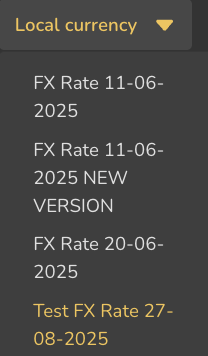
- 1Local currency
- 2Named rate versions
- 3Two versions sharing a date — the name is what distinguishes them
ValueWorks 2026.08
Takeaways
- ⚠ Caution
The selector only affects KPIs maintained in a currency other than the corporate one.
A version is a stored set of rates that can vary month by month — not one fixed rate.
The setting is per person, so agree the version before comparing and state it before quoting.
Surfaces covered
- Reporting
- Settings
Also taught in the Academy
Module 3 · Investigate a number
Take it as lesson 3.10 in Business Analyst & FP&A