Lesson 6 of 8 · 2 min
Flexible Columns
Build a statement whose columns you define.
Sometimes the format is set by someone who has never opened ValueWorks.
Flexible Columns replaces the calendar with columns you create. Add column defines one — it takes a name and the data it should show, and the header carries both, the name above and the data type beneath.
So a column headed REVENUE Budget over Actuals tells a reader exactly what they're looking at, in the words their own organisation uses rather than the platform's.
Reorder columns moves them into the sequence a reader expects. Copy configuration reuses a column set instead of rebuilding it.
This is the view to reach for when a board pack, a lender or an auditor has prescribed a layout you have to match.
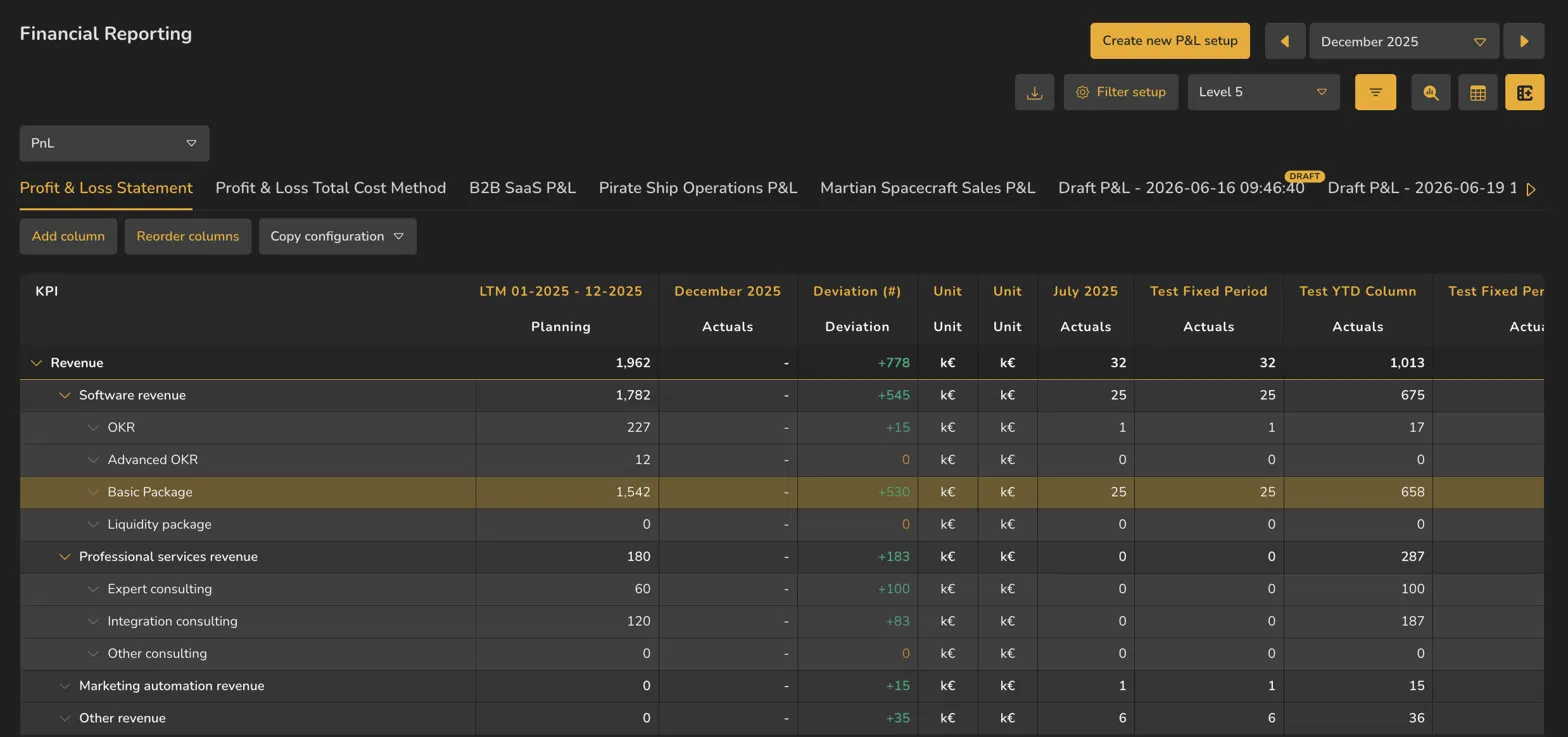
- 1Add column
- 2Reorder columns
- 3Copy configuration
- 4Column name
- 5Data type beneath it
ValueWorks 2026.08
Takeaways
Add column creates a column with your own name and chosen data.
Headers are two rows: the name you gave it, and the data type beneath.
Copy configuration reuses a column set; Reorder columns sequences them.
Surfaces covered
- Reporting
- Financial Reporting
Micro-check
Two quick questions
Practice only — nothing here is scored or recorded.
1. A lender has prescribed a column layout for your monthly return. Which view fits?
2. What do the two rows of a flexible column header show?