Lesson 5 of 6 · 2 min
Making it yours
Configure a personal dashboard.
Your dashboard remembers the month you last looked at — which is useful right up until you forget.
Two controls sit above the tabs.
The offset dropdown sets which month the dashboard reports. It defaults to No offset , and offers −1, −2 and −3 months. The control displays its own state, so “-3 month(s) offset” means every tile is showing figures from three months ago. Use it when month-end data lands late.
The setting persists. Set it once and it will still be applied the next time you open My Dashboard, so read the dropdown before trusting a figure’s date.
Edit unlocks the layout, replacing the header with Select KPIs , Cancel and Save . Each tile gains a resize handle, a Configure button, and a bar-count dropdown — 6 bars, Full year and so on. Nothing is applied until you press Save.
Tile size and bar count together decide how much a tile can show: a small tile shows the value and trend only, while a larger one adds the bar chart and the reference lines.

- 1Offset dropdown displaying its current state
- 2Edit
- 3Tab count badge
ValueWorks 2026.08
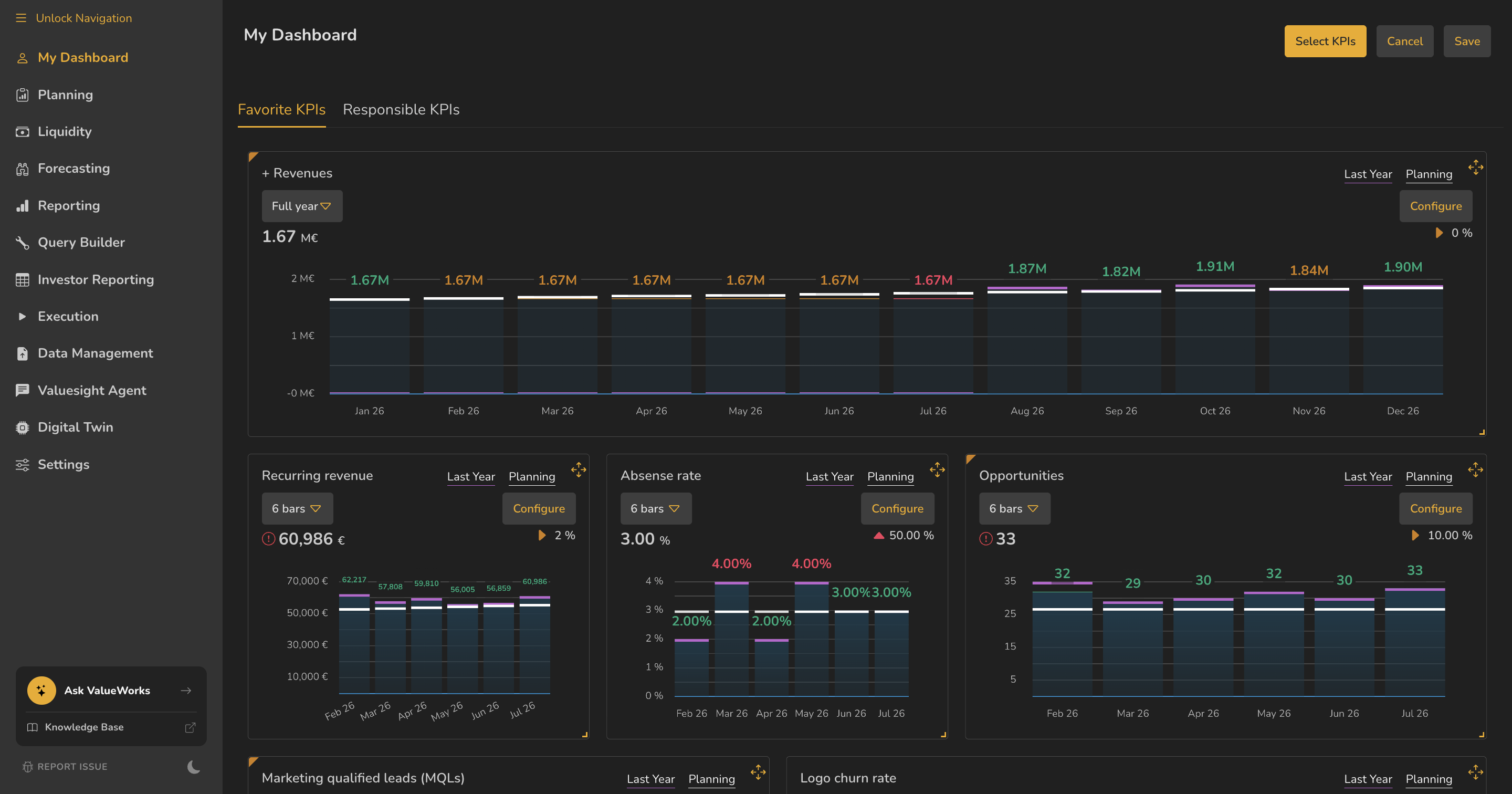
- 1Select KPIs — choose which KPIs appear
- 2Cancel and Save
- 3Bar-count dropdown, per tile — 6 bars, Full year and so on
- 4Configure, per tile
- 5Resize handle
ValueWorks 2026.08
Try this in your tenant — set your offset to −1, then return tomorrow and see what it says.
Takeaways
Default is No offset ; the options are −1, −2 and −3 months.
The offset persists between visits — read it before quoting a figure.
Edit gives every tile a resize handle, a Configure button and a bar-count dropdown — and nothing applies until Save .
Surfaces covered
- Offset (No offset, −1, −2, −3; persists between visits)
- Edit → Select KPIs, Cancel, Save, bar-count dropdown, Configure, resize
Micro-check
Two quick questions
Practice only — nothing here is scored or recorded.
1. You open My Dashboard and the header reads “-3 month(s) offset”, though you don’t remember setting it. What happened?
2. You resize two tiles in edit mode, then navigate away without pressing Save. What happens?