Lesson 6 of 6 · 1 min
Staying in the loop
Follow activity and comment in context.
When someone questions a number, the answer belongs next to the number.
ValueWorks keeps discussion attached to the KPI it concerns rather than in email.
The speech-bubble icon in the top bar opens My activities , listing recent comments across the KPIs you follow. Each entry shows the date and time, the KPI name as a link, the comment text, and who wrote it. Selecting an entry opens the KPI it belongs to.
Comments themselves live on the KPI detail page. Anyone who opens that KPI later sees the discussion, so the reasoning stays with the number instead of in someone’s inbox. Comments stay on the KPI — they are not carried into investor reports or exports.
The practical rule: if an explanation would help the next person who opens this KPI, it belongs in a comment rather than a message.
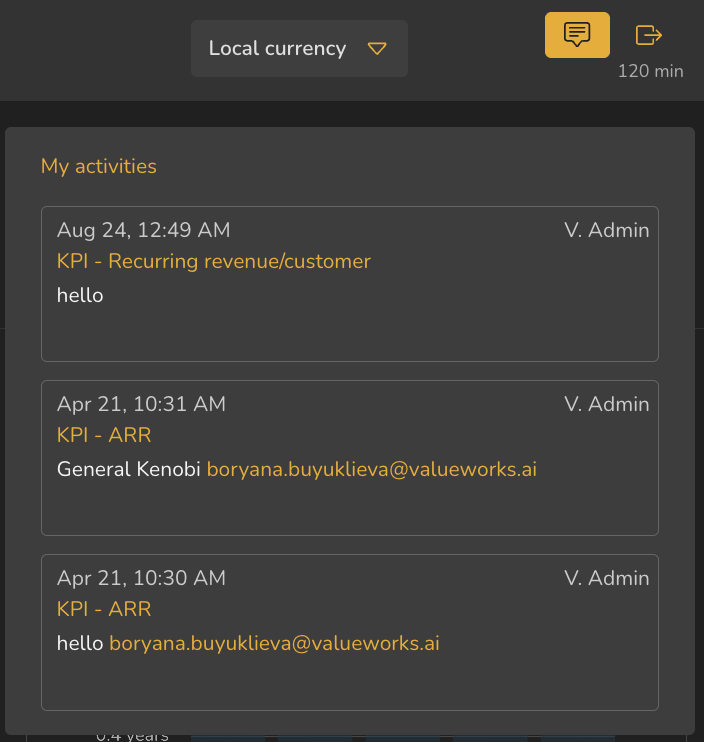
- 1My activities icon in the top bar
- 2Timestamp
- 3KPI name as a link
- 4Comment text
- 5Author
ValueWorks 2026.08
Try this in your tenant — leave a comment on one KPI explaining something you had to work out this month.
Takeaways
My activities collects recent comments across the KPIs you follow.
Comments stay on the KPI — they don’t travel into investor reports or exports.
If the next person would need the explanation, comment rather than message.
Surfaces covered
- My activities
- Comments live on the KPI, not carried into investor reports
Micro-check
Two quick questions
Practice only — nothing here is scored or recorded.
1. You worked out why margin dipped in March. Where does that explanation belong?
2. What does the My activities panel show?